 Documentation
Deploy and monitor
From a flow that works in the Studio to an agent running on its own, reporting what it did — and what to do when it stops.
What a deployment actually is#
There is no platform your agent is uploaded to. A deployment is a folder of ordinary Node code that runs on its own, with the engine vendored inside it and pinned. It will keep running if the Studio is shut down, and it will keep running if the Control Panel is shut down — a board that is down costs a row on a screen, not an answered question.
refund-desk/
  flow.json                 the flow it was generated from
  run.js                    node run.js '{...}' — or --serve to serve it
  src/agent.js              createAgent(options) — the compiled graph
  src/registry.js           createHandlers(), the settings, the bound exports
  src/nodes/<handler>.js     one file per handler    — generated
  src/routers/<name>.js      one file per router     — generated
  src/tools/<name>.js        one file per tool       — generated
  src/services/<name>.js     each service's default  — generated
  src/llm.js                the model behind llm nodes
  src/chat.html             the chat page, self-contained
  test/agent.test.js        smoke tests
  .env.example              every setting it needs, empty
  Dockerfile · .dockerignore
  deploy/nginx.conf.example a proxy, for when more than one person uses it
  vendor/lgflow-<version>.tgz  the engine itself, pinned
  .lgflow/manifest.json     what was generated, and from what
  .lgflow/project.json      what this project is called, and who has worked in it
.lgflow/journal.jsonl the durable record of what it has donevendor/lgflow-<version>.tgz is the compiler and runtime as they were on the day you deployed, installed from the file. An agent deployed six months ago behaves today exactly as it did then, and upgrading is a deliberate redeployment rather than something that happens to you.
1 · Deploy it from the Studio#
- in the Studio Open the flow and resolve everything in the PROBLEMS bar. A flow with problems can be deployed, but you are choosing to.
- in the Studio Press Deploy all… and choose the folder to write into.
- in the Studio Tick what you want done for you: fill a new .env from Settings, npm install afterwards, and put it on the board.
- in the Studio Press Deploy and watch the log. Each generated file is named as it is written.
The manifest records what each file was written from and what was written. Change one node's description and only that node's file is rewritten. Edit a file by hand and it is left alone — and if its description changed too, the new version is written beside it as <file>.generated for you to compare. --force overwrites anyway.
So hand-editing a generated handler is a supported thing to do, not a thing you get away with.
Or from the command line#
The Studio's button is a convenience over the same three commands, which is what a build pipeline uses:
npm run check    -- examples/approval-desk/flow.json
npm run generate -- examples/approval-desk/flow.json --out ../refund-desk
cd ../refund-desk && npm install && npm testThe code generator's own model is gpt-5 by default; LGFLOW_CODEGEN_MODEL or --model changes it. That is the model that writes the handlers, which is a different question from the model the agent runs on.
2 · Configure it#
Everything environmental is in the project's .env, and .env.example lists every name the flow needs, empty. Fill in the values on the machine that will run it.
- on the machine Copy
.env.exampleto.envand fill it in. Model keys, service credentials, MCP server tokens, the board's address and token. - on the machine Set the bind if this agent should be reachable from another machine.
BINDis the chat's andTRIGGER_BINDis the webhooks', both loopback by default and neither implied by the other. - on the machine Run
npm test. The generated smoke tests exercise the graph without calling a model.
It does not travel inside an image. The generated Dockerfile does not copy it and .dockerignore excludes it. An image is pushed to a registry and its layers can be read back with docker history; deleting a key in a later layer does not remove it from an earlier one. Pass secrets at run time with --env-file.
The webhook endpoint has no Host check. Whatever reaches TRIGGER_BIND starts the flow. The chat's Host check is not configurable; the trigger port's protection is the bind and whatever is in front of it. A container has to widen the bind — nothing else should.
You do not have to restart an agent to change a key. The running process watches its own .env: a line added or changed takes effect, and a line removed withdraws the value if that file is what set it last. Without that last part there was no way to take a key away without a restart, which is the one cost the whole arrangement exists to avoid.
3 · Start it#
| What you want | The command | What you get |
|---|---|---|
| One run, at the terminal | node run.js '{"request": "…"}' | Runs once and prints the result. Approvals are asked at the terminal. |
| The chat | npm start | Opens the agent's own chat page in the browser. This is the normal way to run one. |
| Served, for a host to drive | node run.js --serve | A local port with POST /run and POST /resume, each answering a stream of JSON lines. This is what the Studio's Play button starts. |
| As a container | docker build -t asker .docker run --env-file .env -p 127.0.0.1:8080:8080 -v asker-state:/app/.lgflow asker | The same folder, as an image. Note the volume: .lgflow is where the journal and the waiting conversations live, and a container without it forgets both. |
Start a second copy of the same flow and it stands down rather than competing: the first one to reach the board holds the id. The one that stood down says so in its journal as a state entry — it used to say so on stdout alone, until a closed terminal proved that was nowhere.
The chat answers a question. npm test passes. And if you ticked put it on the board, the agent appears in the Control Panel within a few seconds of starting — see the next section if it does not.
4 · Register it with the Control Panel#
An agent registers itself, outward, over a socket it opens. The board never reaches into an agent — that is the one direction this architecture does not go, which is also why the board cannot test your database for you.
- on the machine Set the board's address and its token in the agent's
.env. The variable names are in.env.example; the values are this deployment's. - on the machine Start the agent. On connecting it announces what it is: its flow id, its name, its versions, the capabilities it has, and what it declares it needs.
- in the Control Panel Find it in the Control Panel. It should be
RUNNINGwithin seconds. - in the Control Panel If the flow declares MCP servers, open the agent's MCP tab and switch on the tools it may call. An agent on a board that has never been subscribed calls nothing — see the MCP tutorial.
An agent says what it can do, by name. A board must never decide a capability from a protocol number, because then an older agent's silence is read as a no — and a figure on a screen is believed. The sharpest case is answered further down this page: reading it off the version would turn this agent has not been asked into this agent told nobody anything, which is worse than the gap it replaces.
5 · Liveness and health are two different questions#
This distinction is the one to carry away from this page.
A socket that answers a ping proves the process is up, the connection is up and the event loop can answer. It proves nothing about the work: a revoked model key and a database refusing connections both look perfectly green. So an agent checks its own dependencies and reports what it found.
{ "type": "health", "at": "…", "status": "degraded",
  "checks": [ { "name": "openai",     "status": "ok",    "durationMs": 84 },
              { "name": "postgresql", "status": "error", "durationMs": 1002,
"error": "connect ECONNREFUSED 127.0.0.1:5432" } ] }| Question | Values | Read it as |
|---|---|---|
| The agent's state | RUNNING · PAUSED · STOPPED · DEGRADED | Whether the process is there and taking work. |
| The agent's health | ok · degraded · unknown | Whether it can do the job. Any check failing makes it degraded. |
| One check | ok · error · unknown | unknown is not asked, which is neither passed nor failed. |
An agent happily serving a chat whose database is down is exactly that: up, and unable to do half its job. A screen that collapsed the two into one word would have to choose which lie to tell. unknown is a third state for the same reason — not asked is not refused.
A flow says what the agent does; whether a database answered this minute is operational, and changes between two runs of the same flow. And a board that knew how to test PostgreSQL would need the deployment's own credentials — which it does not have, by design.
A health report may never carry a secret. Not a key, not a connection string, not a bearer token. The check's own error text is sent, and that text is swept first.
6 · Reading what it did#
A run is a run, not a conversation#
Every journal entry says which execution it belongs to, and these five fields are what make a run reassemblable:
runId        the logical run this line is part of
parentRunId  the run that delegated to it, when it is a child
startedBy    what started the whole thing: manual, schedule, event, webhook
triggerId    which trigger, when one did
agent which delegated agent's work this isOne id per logical run, never a second for the same execution. A chat turn mints one; a triggered run reuses the id the trigger runtime already stamped; a delegated agent gets its own with the parent named. Before this, entries carried only the thread — the conversation — so two runs a second apart were indistinguishable and grouping by it merged unrelated work.
The journal is the durable record; the socket is not#
<project>/.lgflow/journal.jsonl, one JSON object per line, appended. The kinds are llm, tool, turn, trigger, question, approval, form and state. A triggered run writes two lines, enter and exit. state is the one kind that is not about a run at all: it is something the agent became.
This file is on the agent's machine and stays there. What reaches a board is a report about it.
API keys, passwords, bearer tokens and connection strings with credentials never leave the agent. Payloads — the input, the outputs, the steps — are stripped before anything is sent, and the report names what it withheld:
{ "kind": "turn", "outcome": "done", "answered": false,
"withheld": ["input", "outputs", "steps"] }That naming is the point. It lets a reader tell there was nothing from there was something and you are not being shown it — two situations a blank field cannot distinguish.
A run that answered nothing says so#
A graph that reaches the end with every output channel empty is a successful run by every other measure. The journal records outcome: "done", the board's ok is true, and an agent's drawer read success rate 100.0% · 2 of 2 finished over a run that told the person in front of it nothing.
So there is a separate boolean, answered, and it is a boolean because it had to cross the line that strips payloads: it says whether anything was written and names nothing that was.
A channel no node ever wrote, one written with null, and one a person reads as a blank screen — all three are not answered. But [] is a node saying none, which is an answer. Filing your search found nothing as this agent told you nothing sends somebody to debug a flow that worked.
What kind of failure it was#
llm · tool · timeout · agent · delegation · validation · trigger · runtime · unknownDecided from the error's class and its code and which call it came out of — never from its message. The messages are written for a person and are improved whenever somebody has a better sentence; a category that moved when a sentence was reworded would be one nobody could count. The category is written on the failed journal entry and on the run's exit event.
They are different things to go and look at. A delegated agent that threw is the child's problem and may work next time. A flow that can delegate round a circle is wrong by construction and will take that route again. Both used to arrive as agent, so one was counted against a failure streak along with the other.
A circle also travels up as itself rather than being wrapped as the agent “x” failed at each level: no one level is at fault, because every agent in it delegated exactly as its own flow says to.
Tokens and cost#
Every model call an agent makes is reported with what it cost, and the board keeps a ledger:
{ "id": "…", "at": "…", "label": "judge for unicell", "model": "gpt-5",
"tokens": { "input": 120, "output": 3, "total": 123 } }The id matters in practice: the ledger deduplicates on it, and without one it falls back to the time, the label and the total — so two calls in the same second that happened to cost the same would be filed as one entry.
Thresholds can be set per agent on durationMs, tokens, llmCalls, toolCalls and tokensPerMinute. Released
Tool calls, including MCP#
- in the Control Panel Open a run. Every model prompt and reply, every tool call with its arguments and its result, every route and every fan-out appears as its own step, in the order it happened.
- in the Control Panel Filter by category. MCP tool calls is a category of its own, separate from ordinary tool calls.
- in the Control Panel For what a server actually offered, open that MCP server's Tools tab — filled in by the agents that connected to it, because the board holds no credential and cannot ask.
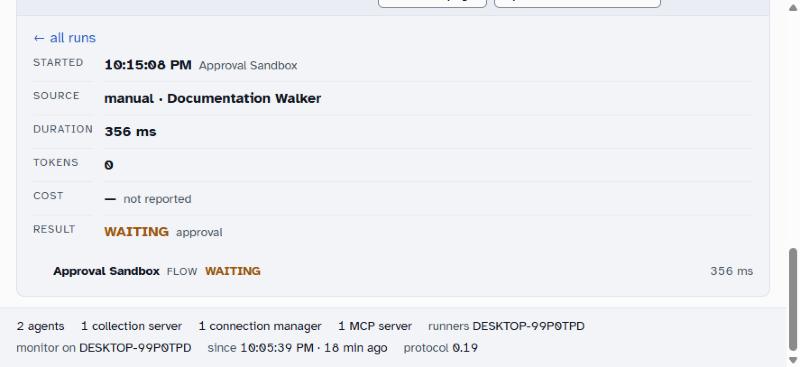
WAITING · approval — it is not finished and it has not failed; it is stopped at a node that needs a person. The row underneath is the flow itself. A flow of handlers has nothing else to show: the model and tool rows appear only where a run made model or tool calls.The Logs tab is the journal, and it lists only what a run actually did. An agent built from handler nodes makes no model calls and no tool calls, so its journal holds its turns and nothing more — which reads as empty beside an agent that talks to a model. What each call sent and got back never leaves the agent's own machine; the board holds the shape of a run, not its contents.
7 · When an agent waits for a person#
A node that needs a person stops the run and asks. Where the asking happens depends on how the agent is being run.
- in the agent's chat In the chat, the reply carries Approve and Decline, with the agent's steps folded underneath. A node missing a required argument shows a form instead, filled in with what is already known.
- on the machine With
node run.jsat a terminal, approvals are asked at the terminal. - on the machine Served, it is
POST /resume { thread, answer }— which is how the Studio's Play button and any other host do it. - in the Control Panel The approval, and who gave it, is on the run.
Waiting conversations are kept in node:sqlite, which arrived in Node 24. On an earlier Node the agent still runs, and still waits, but it says Waiting: in memory on startup — and a restart loses every half-filled form and every pending approval. If the flow has an ask, a form or an approve, treat Node 24 as required rather than recommended.
8 · Pausing, stopping and restarting#
| State | What it means | How it gets there |
|---|---|---|
RUNNING | Up and taking work. | The process is started and has registered. |
PAUSED | Up, and not taking work. The process is alive, the socket is connected, new work is refused. | Paused from the Control Panel, by somebody with the privilege to. |
STOPPED | It has reported, and then gone. | The process ended. This is distinct from an agent that never connected at all. |
DEGRADED | A health question, not a state question — see above. | One of its own checks failed. |
A paused agent holds its flow id, keeps its connection, and refuses new work. That is what you want while a database is being migrated: the work queues up somewhere you can see rather than failing one request at a time, and nothing else grabs the id.
Restart and recovery#
- on the machine Restart the process. It re-registers, re-reads its
.env, and picks up its journal where it left off. - on the machine Waiting conversations survive the restart if the agent is on Node 24 or later and, in a container, if
.lgflowis on a volume. Otherwise they are gone and the people waiting will have to start again. - in the Control Panel Check the state and the health separately. A restart that fixed the process will not have fixed a revoked key.
9 · Redeploying#
- in the Studio Change the flow and deploy to the same folder. Only what changed is regenerated, and hand-edited files are left alone.
- on the machine Run
npm installif the engine version moved —vendor/lgflow-<version>.tgzis a new file and the pin points at it. - on the machine Restart the process. The old one stands down as the new one takes the flow id.
- in the Control Panel Confirm the version the board now shows is the one you deployed.
If the engine's version moved while the Studio was open, deploys are refused until it is restarted. And restarting the Studio signs you out — so it is three steps, not one: restart, refresh, sign in again.
Troubleshooting#
| Symptom | Likely cause | What to do |
|---|---|---|
| The agent never appears on the board | The board's address or token is not set, or the board is not reachable from that machine | Check the two variable names in .env. The agent's own stdout says whether it is trying. |
| It appears and immediately stands down | Another process already holds that flow id | Intended. Find the other copy — its own journal has a state entry explaining itself. |
RUNNING but every answer fails | A dependency is down; the state and the health are different questions | Open its health checks. The failing one names itself and its error. |
| It refuses all its MCP tools | It is on a board and nobody has subscribed it | Expected, not broken. Agent → MCP, switch them on. |
| Runs succeed but tell the person nothing | Every output channel ended empty | Look at answered rather than outcome. A 100% success rate can sit over this. |
| Approvals vanish on restart | Node earlier than 24, or a container with no volume on .lgflow | The agent said Waiting: in memory at startup. Upgrade Node, or mount the volume. |
| Nothing is reachable from another machine | Both binds are loopback by default | Set BIND and TRIGGER_BIND deliberately and separately. An agent bound wider than loopback says so on stdout. |
| A deploy is refused | The Studio has been open across an engine version bump | Restart it, refresh, sign in again. |
npm testpasses in the deployed folder.- The chat answers a question that exercises the agent's real work.
- The board shows it
RUNNING, with the version you deployed. - Its health checks are listed, and each one is
okrather thanunknown. - That conversation appears as a run, with its steps and its model calls.
- The run's
answeredis true — not merely itsoutcome. - If the flow waits for a person: a pending approval survives restarting the process.
What to do next#
- What a run shows — the tree, the journal, and the four questions kept apart.
- Triggers — a schedule, an event or a webhook, for when nobody is talking to it.
- Monitoring — what the board knows and how it learns it, in full.
- Deployment — what the Studio writes and what it vendors, in full.
- The developer reference — the DSL, the API and the protocol.
The generated project's layout, the health shape, the run fields, the failure categories, the journal kinds, the answered rule and the spend entry were read out of the engine's own guides and the monitoring protocol at Core 0.61.0, protocol 0.19. The Control Panel procedures — registering, pausing, reading a run, setting a threshold — have not been walked against a live board for this edition, so they are given as the screens' names rather than as a click-by-click script, and the screenshot is marked pending. Beta