 Documentation
Build your first MCP agent
An agent that calls real tools on an MCP server — declared in the flow, granted on the board, and traceable call by call.
What an MCP server is, and what it is not#
An MCP server is a separate program that exposes a set of tools over the Model Context Protocol. It might be in front of your CRM, your ticketing system, a database or a filesystem. It is not part of Symphonix, it is not started by an agent, and it has its own lifetime, its own address and its own credentials.
The agent runtime is the deployed project. It holds the flow, the generated client for each declared server, and the model calls. When a tool is called, the agent connects to the MCP server, makes the call, and gets a result back. That is the whole relationship.
A flow declares an MCP server; it never describes one. The whole of what a flow says about a server is its name and which of its tools this flow may call. Transport, address, command and credential are the deployment's, and come from the environment.
Two consequences worth having. The same flow runs against a sandbox on your machine and the real system in production without changing. And the client code is generated from the declaration rather than written by a model from a paragraph — which matters, because the last time a model wrote a service from prose it compiled a developer's folder path into a deployed project.
Five screens say “MCP”, and they are five different things#
This is the single most common source of confusion, so it is worth two minutes before you touch anything. These are the names the product itself uses.
| The word | Where it is | What it answers |
|---|---|---|
| The catalogue | Control Panel → Settings → MCP servers, and the Servers tab | Where each server is — transport, address or command, and the name of the variable holding its token. The organisation's infrastructure. Needs agents.manage. |
| The subscription | Control Panel → one agent → MCP | Which of that server's tools this agent may call. Reaches the running agent over its socket. Narrows, never widens. Needs access.manage. |
| The declaration | Studio → the flow's MCP SERVERS tab (requires.mcp) | What the flow says it needs — a server by name and the tools it may call, and nothing about where any of it is. |
| The mapping | Studio → Solutions → the MCP field | Which registered server a solution's alias means. A solution arrives calling its CRM crm; this installation's is crmProd. |
| What it offers | Control Panel → one MCP server → Tools | What that server actually has, in its own names — reported by an agent that connected to it, because the board holds no credential and cannot ask. |
Three cases, and the third is the one people get wrong.
- No board. The flow's declaration governs. The agent may call what it declared.
- A board that has spoken. The subscription governs — it narrows the declaration and can never widen it.
- A board that never spoke. Nothing. The agent calls nothing until it is told.
That last one is deliberate: nobody has decided must never be read as everything. In practice it means an agent registered with a board but never subscribed will refuse its own tools and say so — which looks like a broken agent and is a working one. Section 7 is where you switch them on.
1 · Register the server in the catalogue#
This is done once for the organisation, by somebody with agents.manage. Every agent then draws on it.
- in the Control Panel Sign in to the Control Panel and open Settings, then the MCP servers tab.
- in the Control Panel Add an entry. What it holds is where the server is: a name that agents will use, a transport (
httporstdio), and either a url for http or a command for stdio. - in the Control Panel For the credential, give the name of the environment variable that holds the token — not the token. The board stores the name and never the value, which is why it cannot authenticate to the server itself.
- in the Control Panel Save the entry. Note the name exactly: it is the string your flow will declare.
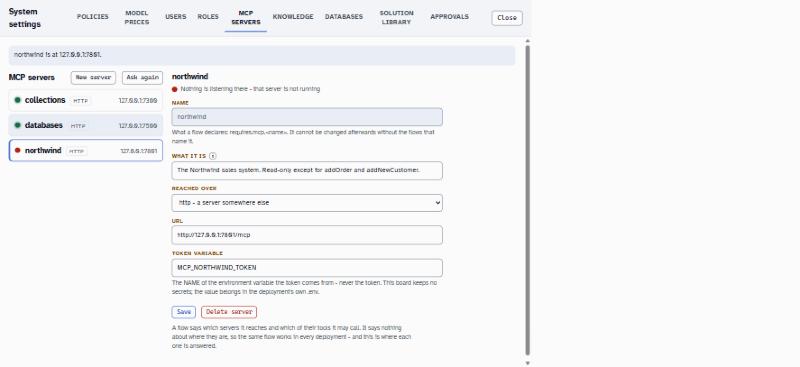
MCP_NORTHWIND_TOKEN — a name, not a token, and the screen says so itself.So that the board cannot reach your systems. It is a governance surface, not a proxy. The consequence is the one in the table above: the board cannot ask a server what tools it has — only an agent that holds the credential can, which is why Tools is filled in by an agent reporting what it found.
2 · Find out what tools the server has#
- in the Control Panel If an agent on this installation has already connected to this server, open the server and look at its Tools tab. It lists what the server offered, in the server's own names, against what the flows declare — and names any disagreement.
- in the Control Panel If nothing has connected yet, that tab is empty, and it is empty for a correct reason rather than a broken one. Take the tool names from the server's own documentation for now; they will appear here once your agent has run.
3 · Declare the server in your flow#
Back in the Studio. The declaration is the ceiling: a server exposing twenty tools gives this flow only the ones listed.
- in the Studio Open your flow and select the MCP SERVERS tab on the right-hand panel.
- in the Studio Add the server by the name you registered, and list the tools this flow may call. In the file it looks like this:
"requires": { "mcp": { "crm": { "describe": "The customer system. Read-only except for openTicket.", "tools": [ "findCustomer", { "name": "openTicket", "remote": "create_ticket", "describe": "Raises a support ticket.", "inputs": { "about": { "type": "string", "required": true, "label": "What is wrong" } } } ] } } } - in the Studio Note three things in that example. The tool list is the permission.
remoteis the name the tool has on the server, for when it differs from the name your flow wants — which is how two servers that both exposesearchare told apart. Andinputssays what the tool takes.
This is checked, and refused (from 0.25). The keys that carry an address were refused from the first day, and describe was the way round them — nobody had to mean anything by it. Measured: asked to use a server the person had named by its folder, a model declared the name and the four tools perfectly and then wrote “Local MCP server at C:\Dev\Apps\mcpDb exposing…” into the describe, carrying a developer's machine into every copy of that flow.
Say what the system is and what the agent may do with it. A server declared with no tools at all is refused too — it reaches nothing, so it is a mistake rather than a narrowing. The narrowing is which tools are listed.
If a call is missing a required input, the run stops and shows the person a form asking for it, filled in with what is already known — and nothing is called until it passes. You do not write any of this into a prompt. A node asked to open a ticket with no details calls the tool with none, and the person gets the form.
Without inputs, a model with no way to ask writes a paragraph listing the fields instead, which is not the same thing at all.
A tool declared by name alone is still fully described to the model: the MCP server is asked once, and what it says each tool is for and what it takes is what the model sees. Anything the flow says — a describe, an inputs field — wins over the server's version of the same thing, and the rest is the server's, unchanged. Declaring by name is not declaring less.
4 · Configure the work node#
This is where the agent actually uses the tools. One node does it.
- in the Studio Add a node and set its KIND to
work. - in the Studio Set PROMPT to what you want it to achieve — not to a procedure. The model decides which tools to call.
{ "id": "answer", "type": "work", "prompt": "Answer the question using the customer system.\n{{history}}\nQuestion: {{question}}", "tools": ["crm"], "output": "answer" } - in the Studio Set tools. It takes server names — meaning every tool the flow declares on that server — or individual tool names, to give this node less than the flow has.
- in the Studio Set OUTPUT to the channel the answer goes in.
- in the Studio Optionally set
rounds, which caps how many times round the loop. The default is 8. Reaching it fails the run by name rather than returning half an answer. - in the Studio Optionally set
approve, listing tools that need a person first. The run pauses at that call and carries on with the model's own work when the answer comes back.
A word in tools that is both a server and a tool of this flow is refused as ambiguous, and the error names the word. Rename one — a precedence rule nobody reading the flow would know is worse than a two-second rename, and a flow that silently meant the other set is worse than both.
A server name that is also a service or a setting is refused for a different reason: all three arrive on the same object, so a handler reading services.crm cannot tell which was meant. One name, one meaning.
The two execution patterns, and which one the platform gives you#
Pattern 1 — ReAct, or dynamic tool calling#
The model is handed the tools and calls them itself, one after another, until it has an answer. Directly supported: this is exactly what a work node is (DSL 0.24). You have just built one. Released
Use it when the work is a handful of lookups whose order depends on what comes back, and when a fresh answer each time is fine. It is the reference's own recommendation for most tool use, and it is one node.
What you give up: the plan is never visible before it runs, a failure halfway through leaves you reasoning about a transcript, and the cost of a turn is whatever the model decided to do.
Pattern 2 — Plan and Execute#
A planner writes a task list, a loop picks the next task, an executor runs it against the tools, the result is evaluated into task state, and the loop continues, replans or finishes.
The node kinds the platform accepts are handler, llm, tool, tools, fanout, ask, form, read, flow, agent, work, knowledge, index and database. None of them is a planner.
Plan and Execute is therefore composition, not a feature: ordinary nodes and a conditional edge, assembled. It needs no new language features — a conditional router with routes and limits is how a loop goes round and stops. Released as a pattern you can build; Design only as anything you could switch on.
Use it when the plan should be visible before anything runs, when each task deserves a fresh context, when one failure should leave only its dependants unattempted, and when replanning should be a decision in the open rather than an emergent behaviour.
What it costs. The real cost is not the language, it is the state contract: a plan is a list of tasks with dependencies and outcomes, and the shape of a task has to be settled once — in the channel's own description — before several generated handlers are written against several readings of it.
Worth knowing before you compose the diagram above, because it shapes it. A conditional edge's router is generated JavaScript, and a model asked to write JavaScript that reads what somebody meant writes a list of regular expressions. One written that way had seventeen patterns, matched “add customer” and not “add cust”, and sent the question to the wrong half of an agent — where a second model answered it from the wrong half's data. Nothing in the flow said anything was wrong.
So where a route leads to an MCP server, an llm node classifies into a channel and the edge routes on that channel. The decision costs what it costs in the open and appears in the run like every other model call. Edges that only choose between ordinary handlers are unaffected — that is what a router is for.
A step budget is not enough: a planner that replans identically goes round until the budget stops it and then reports a plan nobody executed. The bound with teeth is progress — the gate that adopts a plan compares the proposal with the outstanding work it would replace, and a proposal that changes nothing is not adopted. The run stops at the first repeat, for having made no progress, and reports what it has. A counter is the net under that, not the mechanism.
There is a worked version of all of this in the product repository, as the Classic MCP solution under examples/solutions/classic-mcp. Released
5 · Test the tool calls before deploying#
- in the Studio Check the PROBLEMS bar. A flow that declares an MCP server needs nothing else — the generated scaffold brings the protocol package in. A flow that only talks about MCP in prose, without declaring a server, is told to add the package by hand, which is the sign you have described a server where you should have declared one.
- in the Studio Press ▶ Play and ask something that needs a tool.
- in the agent's chat Watch what happens. A tool call that is missing a required input shows you a form — that is the designed behaviour, not a failure. A tool listed in
approvepauses and waits for a person. - in the Studio Use the history view to see the calls themselves. Its filter includes MCP tool calls as a category of its own.
In Play, a question that needs a tool produces an answer that could only have come from the tool — a real customer name, a real ticket number. If the answer is plausible but generic, the model may be answering from its own knowledge: ask something it cannot possibly know.
6 · Deploy it#
Exactly as in the first tutorial: Deploy all…, choose a folder, tick fill a new .env from Settings, npm install afterwards and put it on the board, then Deploy.
The generated project needs whatever the MCP server requires, under the variable name you registered in the catalogue. Put it in the project's .env. It is not in the flow, it is not on the board, and it does not travel in the image — the generated Dockerfile does not copy .env and .dockerignore excludes it, because an image is pushed to a registry and its layers can be read back.
7 · Switch the tools on, on the board#
This is the step people miss, and missing it looks exactly like a broken agent.
- on the machine Start the deployed agent and let it register.
- in the Control Panel Open the Control Panel, find the agent, and open its MCP tab. This is the subscription — which of the declared tools this particular agent may call.
- in the Control Panel Switch on the tools this agent should have. You can only narrow what the flow declared; nothing here can widen it.
- in the Control Panel Save. The change reaches the running agent over its socket — the agent does not need restarting.
And it says so, rather than failing silently: it answers that it has not been told which of its tools are switched on, and that it calls nothing until it is. That is the third case of the three-way rule above. If a freshly deployed agent refuses all its tools, this is almost always why.
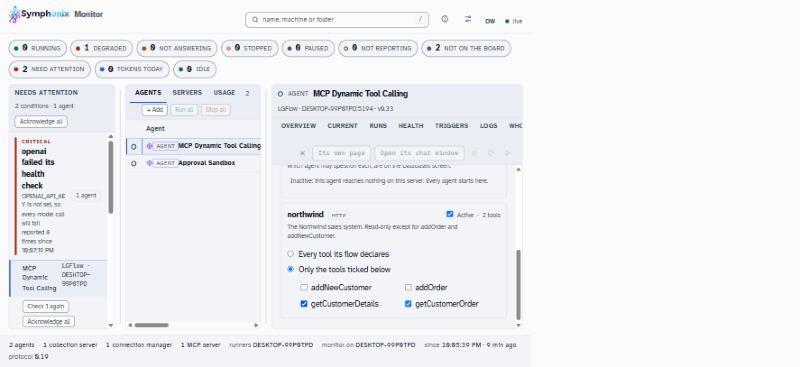
northwind; two are switched on here, so two is what this agent may call. The screen's own words are the smaller of the two wins, so attaching here can never widen what its code can do.8 · Verify the calls are really happening#
- in the agent's chat Open the agent's own address and ask a question that needs a tool.
- in the Control Panel Open the agent's runs on the Control Panel and find that conversation. Each tool call appears as its own step, with what was sent and what came back.
- in the Control Panel Open the MCP server's Tools tab. It should now be filled in — your agent connected and reported what the server offered. If the server offers tools your flow does not declare, this is where the difference is named.
- The server is in the catalogue with an address and a variable name, and no token is stored on the board.
- The flow's MCP SERVERS tab lists the server and the tools it may call.
- The deployed agent is on the board, and its MCP tab shows the declared tools with the ones you chose switched on.
- A question that needs a tool is answered with something the model could not have known.
- That run shows the tool call, with its arguments and its result.
Diagnosing permission and connection failures#
| Symptom | Which of the five screens | What to do |
|---|---|---|
| The agent says it has not been told which tools are switched on | The subscription | Nobody has subscribed it. Control Panel → the agent → MCP. This is the expected state for a new agent, not a fault. |
| The agent refuses one particular tool | The subscription or the declaration | Check both: the tool must be in requires.mcp and switched on. The declaration is the ceiling; the subscription is the switch. |
| The Studio refuses the flow over a tool name | The declaration | A name that is both a server and a tool is refused. Rename one, or use remote. |
| The agent cannot connect at all | The catalogue | The address or transport is wrong, or the credential variable is not set in the agent's .env. The board cannot test this for you — it holds no token. |
| A tool is called with the wrong name | The catalogue vs what it offers | Open the server's Tools tab and compare. Use remote to map your flow's name to the server's. |
| A solution's server name does not exist here | The mapping | Studio → Solutions → the MCP field. Point the solution's alias at your registered server. |
| The run fails having reached its round limit | Neither — the work node | Raise rounds, or narrow the task. Failing by name is deliberate: half an answer would be worse. |
What to do next#
- Deploy and monitor — the lifecycle, health, and reading a run properly.
- Multi-agent — when one agent should call another instead of growing more tools.
- Human in the loop —
approvein full, and who gets asked. - The DSL reference —
requires.mcpandworkin their own words.
The work node's behaviour, its rounds default of 8, the requires.mcp shape and the list of node kinds were read out of the DSL reference and the validator in Core 0.61.0. The five-screen table and the three-way rule are the platform's own vocabulary. The Control Panel steps — registering a server, and subscribing an agent — have not been walked against a live board for this edition, so their field-level detail is given as the screens' names rather than as a click-by-click script, and the two screenshots are marked pending. Beta